A shop owner in Delhi buys a “bulk WhatsApp sender” for ₹1,999, uploads 5,000 numbers and sends a Diwali offer. By the next morning, the number he has used for eight years is banned. His customers, suppliers and every old chat are gone.
Stories like this are common, because most people don’t know where the line is. Bulk WhatsApp marketing is not illegal or banned by itself. Done the right way, it is one of the best-performing channels for Indian businesses. Done the wrong way, it can cost you your number. This guide explains exactly what is allowed, what gets you banned, what it costs, and how to run a safe campaign.
Key takeaways
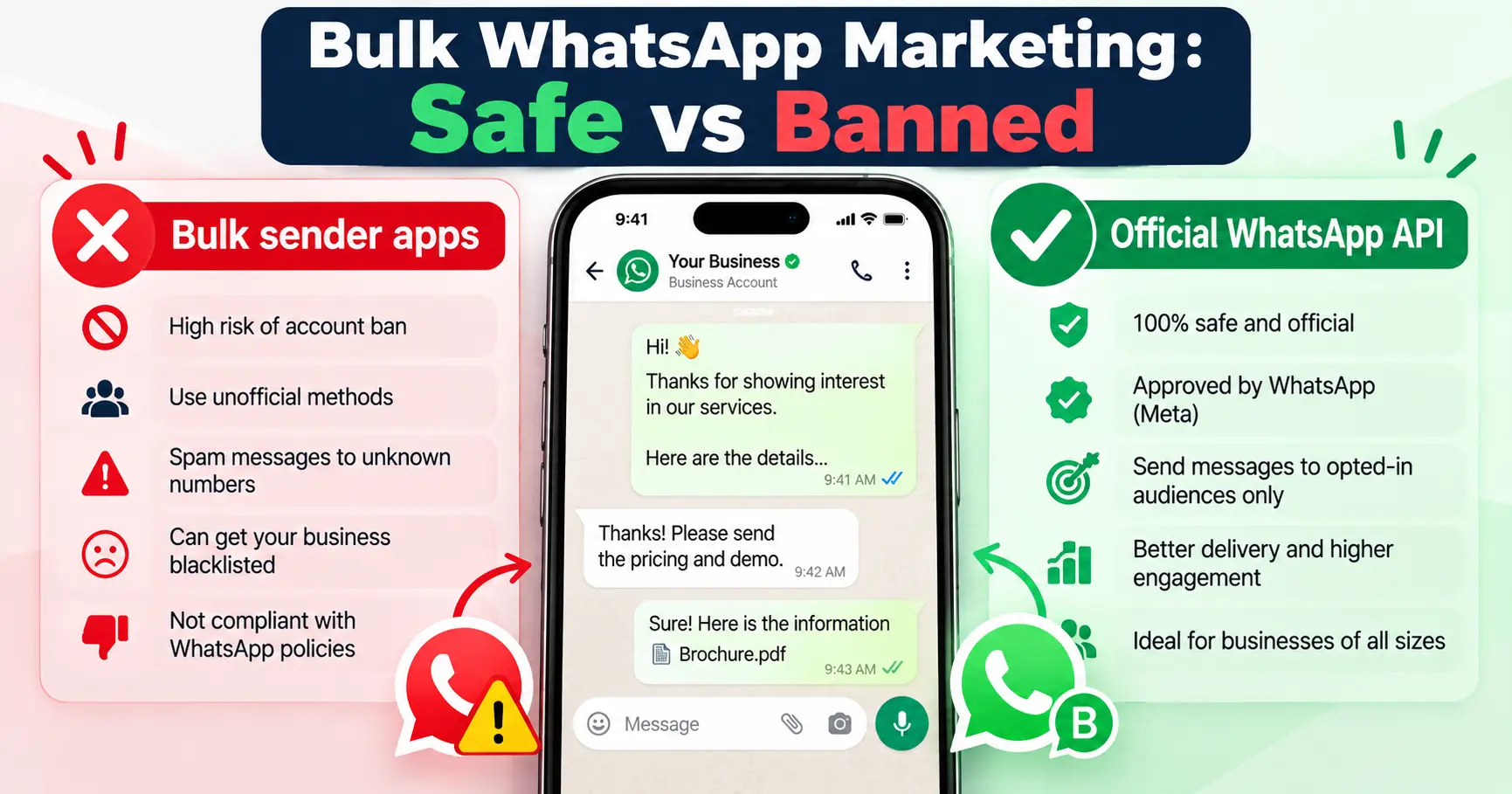
- Sending bulk messages through unofficial “bulk sender” apps or software breaks WhatsApp’s terms and is the most common reason numbers get banned.
- The WhatsApp Business app lets you broadcast to up to 256 contacts per list, and only people who have saved your number receive it.
- For real bulk marketing, use the official WhatsApp Business Platform (API) with approved message templates.
- Every person you message must have opted in to hear from you on WhatsApp, and must be able to opt out easily.
- Meta charges per message on the API. Marketing messages cost the most, and Meta also limits how many marketing messages each user receives.
What is bulk WhatsApp marketing?
Bulk WhatsApp marketing means sending the same message, like an offer, launch or reminder, to many customers at once. There are three ways businesses do it in India, and only two of them are allowed:
| Method | Allowed? | How many people | Risk | Cost |
|---|---|---|---|---|
| Broadcast lists in the WhatsApp Business app | Yes | Up to 256 per list, only contacts who saved your number | Low, if people know you | Free |
| Unofficial bulk sender apps, Chrome extensions or “WhatsApp marketing software” that automate the normal app | No | Thousands, until the number is blocked | Very high. Your number can be banned permanently | ₹500 to ₹5,000 for the tool, plus the number you lose |
| WhatsApp Business Platform (API) through an official provider | Yes | From 250 a day at the start, rising to unlimited | Low, if you follow the rules | Per-message charges from Meta, plus the provider’s fee |
Why WhatsApp bans numbers for bulk messaging
WhatsApp’s systems look at how people react to your messages, and how your messages are being sent. These are the patterns that most often lead to a ban:
- Using unauthorised software. WhatsApp’s terms do not allow automated or bulk messaging through unofficial apps. These tools are easy for WhatsApp to detect.
- Messaging people who don’t know you. Bought or scraped number lists lead to blocks and spam reports, and those are the strongest negative signal.
- Many blocks and reports in a short time. Even a genuine business can get restricted if a large share of recipients block it.
- Sending the same text to hundreds of new chats at once from a normal or Business app number.
- Suspicious links, such as shortened URLs, or messages that promise unrealistic money, prizes or “guaranteed returns”.
A ban usually affects the whole number. You lose access to all chats on it, including your existing customers. That is why you should never test unofficial tools on your main business number.
What is allowed: the rules for bulk WhatsApp messages
If you want to send WhatsApp messages at scale, these are the rules that the official platform and WhatsApp’s Business Messaging Policy expect you to follow:
- Get opt-in first. The person must have agreed to receive messages from your business on WhatsApp. The opt-in should clearly name your business and say that messages will come on WhatsApp.
- Use approved templates to start a conversation. On the API, any message you send first (outside a customer service window) must be a template that Meta has approved.
- Choose the right template category. Templates are classed as marketing (offers, launches), utility (order updates, appointment reminders) or authentication (OTPs). Don’t disguise a promotion as a utility message.
- Make it easy to opt out. Add a line like “Reply STOP to stop receiving offers” and actually honour it.
- Reply freely within 24 hours. When a customer messages you, a 24-hour customer service window opens. Within it, you can reply with normal messages.
Examples of good opt-in
- Website form: a checkbox that says “Yes, send me updates and offers from [Business Name] on WhatsApp.”
- Click-to-WhatsApp ads: when a person taps your Meta ad and messages you, they start the conversation. Ask them in the chat if they want offers in future.
- In-store QR code: “Scan to get our price list and offers on WhatsApp.”
- At billing: ask the customer, and note their consent along with the date.
WhatsApp messaging limits in 2026
On the official platform, Meta limits how many new people you can message per day. Since October 2025, this limit applies to your whole business portfolio, not to each phone number.
| Stage | Daily limit (unique customers you start chats with) |
|---|---|
| New business portfolio | 250 |
| Next tier | 2,000 |
| Next tier | 10,000 |
| Next tier | 100,000 |
| Highest tier | Unlimited |
The limit goes up automatically when you send good-quality messages and use at least half of your current limit within the last 7 days. Replies to customers who message you first don’t count towards it.
Meta also applies per-user limits on marketing messages. If a customer rarely reads marketing messages, WhatsApp may not deliver your promotion to them, even if they opted in. The way around this is simple: send fewer, more useful messages that people actually open.
How much does bulk WhatsApp marketing cost?
With the WhatsApp Business Platform, you pay in three parts:
- Meta’s per-message charge. Each delivered template message is charged based on its category and the recipient’s country. Marketing messages cost the most. Utility and authentication messages cost less. Messages customers send you are free.
- Your provider’s fee. The software company (Business Solution Provider) that gives you the dashboard, broadcast tool and chatbot charges a monthly plan, and sometimes a markup per message.
- GST on the provider’s services.
Meta updates its rates from time to time, and India’s billing moved to rupees in 2026. Always check the current rates on Meta’s official pricing page before planning a large campaign.
How to run a safe bulk WhatsApp campaign: step by step
- Build an opted-in list. Use only customers and leads who agreed to hear from you on WhatsApp. Remove everyone else.
- Set up the WhatsApp Business Platform through an official provider, with your business verified in Meta Business Manager.
- Write the template. Keep it short, personal and useful. Add your business name and an opt-out line.
- Submit it for approval in the correct category (marketing for offers).
- Segment your list. Send interior offers to people who asked about interiors, not to everyone.
- Start small. Send to your most engaged customers first, check replies and blocks, then expand.
- Reply fast. A campaign creates conversations. Have your team or an AI agent ready to answer within minutes.
- Measure and clean. Track reads, replies and opt-outs, and remove people who ask to stop.
A compliant promotional message example
“Hi Priya, this is [Business Name] 👋 Our Diwali offer is live: 15% off on modular kitchens booked before 31 October. Want us to share a few designs and a quick estimate? Reply YES. Reply STOP to stop receiving offers.“
It names the business, gives one clear offer with a real deadline, asks for a simple reply and includes an opt-out. Avoid fake urgency like “Only 2 hours left!” when it isn’t true. Misleading offers can create trouble under consumer protection rules, not just with WhatsApp.
Mistakes to avoid
- Buying “targeted” number lists or scraping numbers from Google Maps and directories.
- Using your personal or main business number to test bulk tools.
- Sending the same offer every day. More messages means more blocks.
- Hiding the opt-out, or ignoring people who say stop.
- Sending messages at night. Keep promotions to normal business hours.
- Making claims you can’t back up, such as “lowest price in India” or “guaranteed results”.
A note on consent and Indian data law
Apart from WhatsApp’s own rules, India’s Digital Personal Data Protection Act, 2023 sets out how businesses must collect and use personal data, with consent at its centre. Keep a record of when and how each customer gave consent, and use their number only for what they agreed to. For legal questions specific to your business, speak to a qualified advisor.
How we help businesses run WhatsApp marketing the right way
At SKP DigitX, we set up WhatsApp marketing on the official WhatsApp Business Platform, from opt-in forms and template approval to segmented campaigns. We connect it to a WhatsApp AI agent that replies to every response instantly, shares photos and prices, and books visits, so your campaign turns into real conversations instead of unread messages.
Want to know if your current WhatsApp setup is safe? Book a free lead audit and we’ll review it with you.
Frequently asked questions
Is bulk WhatsApp messaging legal in India?
Sending marketing messages on WhatsApp is legal when people have agreed to receive them and you follow WhatsApp’s policies. Using unofficial software to blast messages to people who never opted in breaks WhatsApp’s terms and can get your number banned.
How many messages can I send in one day on WhatsApp?
In the WhatsApp Business app, broadcast lists hold up to 256 contacts each, and only contacts who saved your number receive them. On the WhatsApp Business Platform, new businesses start with 250 unique customers a day, and the limit can grow to 2,000, 10,000, 100,000 and then unlimited.
Can I get my banned WhatsApp number back?
You can request a review from inside the app if you believe the ban was a mistake. Bans caused by bulk messaging with unofficial tools are often not reversed, so prevention is far better than appeal.
What is the best WhatsApp bulk message sender?
The safest choice is a provider built on the official WhatsApp Business Platform. Avoid any tool that asks you to scan a QR code with your normal WhatsApp to “send unlimited messages”, because that is exactly what WhatsApp blocks.
Do I need the API for bulk messaging?
For a small, loyal customer base under a few hundred people who have saved your number, broadcast lists in the free app can work. For anything larger, or for automation and tracking, you need the WhatsApp Business Platform.
Final word
Bulk WhatsApp marketing works when it feels like a message from a business people know, not spam from a stranger. Get consent, use the official platform, send fewer and better messages, and reply fast. Do that, and WhatsApp can become your highest-converting marketing channel without putting your number at risk.
If you want help setting it up, read our guide on setting up WhatsApp Business automated messages first, or talk to us about the full system.